Introduction: Engineering Beyond Physical Limits
Computer-Aided Engineering (CAE) is transforming how engineers design, test, and optimize products. By using advanced computer simulations and numerical methods, engineers can predict how a product will behave under real-world conditions before manufacturing a physical prototype.
From automotive crashworthiness and aircraft structural integrity to fluid dynamics, heat transfer, and electromagnetic performance, CAE helps companies evaluate complex engineering challenges in a virtual environment.
Traditionally, product development relied heavily on physical prototypes and repeated laboratory testing. Today, CAE allows engineering teams to investigate thousands of design variations, identify potential weaknesses earlier, and make more informed decisions throughout the product development process.
However, simulation is not a complete replacement for physical testing. Reliable engineering depends on accurate models, validated simulation results, and physical tests where necessary.
1. What Is CAE (Computer-Aided Engineering)?
CAE refers to the use of computer-based tools to analyze, simulate, and optimize engineering designs and processes.
CAE software uses mathematical models and numerical methods to predict the behavior of components, assemblies, and complete systems under specified operating conditions.
The most common CAE disciplines include:
- Finite Element Analysis (FEA): Evaluates stress, strain, deformation, vibration, fatigue, and structural integrity.
- Computational Fluid Dynamics (CFD): Simulates fluid flow, turbulence, pressure distribution, and aerodynamic performance.
- Thermal Analysis: Predicts heat transfer, temperature distribution, and thermal expansion.
- Electromagnetic Simulation: Analyzes electric and magnetic fields, motors, sensors, and electromagnetic compatibility.
- Multiphysics Simulation: Examines how multiple physical phenomena interact within the same system.
- Optimization and Durability Analysis: Helps engineers improve performance, reduce material usage, and estimate product life.
By integrating these capabilities into product development, companies can detect design weaknesses earlier and reduce the number of costly development iterations.
2. The Evolution of CAE Technology
CAE has evolved from specialized numerical calculations into an essential part of modern digital engineering.
Early Engineering Analysis
Early computer-based engineering analysis focused primarily on structural calculations and finite element methods. These techniques enabled engineers to solve increasingly complex problems that would have been difficult or time-consuming to evaluate manually.
Growth of Commercial Simulation Software
As computing power improved, commercial CAE platforms expanded into nonlinear structural analysis, fluid dynamics, thermal simulation, crash analysis, and other specialized disciplines.
Industries such as aerospace, automotive, energy, and heavy manufacturing began using simulation more extensively to support product development and safety engineering.
Integrated Digital Engineering
Modern CAE tools increasingly integrate with CAD, product lifecycle management (PLM), high-performance computing, and cloud-based workflows.
Engineers can now transfer design geometry into simulation environments, automate repetitive analyses, compare multiple design alternatives, and collaborate across engineering teams.
The Future: AI-Assisted Simulation
Artificial intelligence and machine learning are beginning to support engineering simulation through faster design exploration, surrogate models, automated optimization, and improved workflows.
These technologies can reduce the computational effort required for selected tasks, although high-fidelity physics-based simulation and engineering validation remain essential for many applications.
3. Leading CAE Software Used in Industry
Several established software platforms support different engineering disciplines. The right choice depends on the physics being analyzed, the required accuracy, the industry, and the existing engineering workflow.
3.1 ANSYS
ANSYS is a widely used engineering simulation ecosystem covering multiple disciplines, including structural mechanics, computational fluid dynamics, thermal analysis, and electromagnetics.
Its products support applications ranging from component-level stress analysis to complex multiphysics engineering problems.
Key capabilities:
- Structural analysis using finite element methods.
- CFD for aerodynamic and fluid-flow investigations.
- Thermal and coupled-field simulation.
- Electromagnetic analysis for electrical and electronic systems.
- Design exploration and optimization.
Typical applications: Automotive engineering, aerospace, energy, electronics, industrial machinery, and product development.
Official website: https://www.ansys.com/
3.2 Abaqus (Dassault Systèmes)
Abaqus is particularly well known for advanced finite element analysis and challenging nonlinear engineering problems.
It is frequently used when material behavior, contact interactions, large deformation, impact, or complex structural responses require detailed investigation.
Key capabilities:
- Nonlinear structural analysis.
- Large deformation and contact simulation.
- Impact and dynamic event analysis.
- Advanced material modeling.
- Applications involving damage and failure, depending on the selected model and solver capabilities.
Typical applications: Automotive crashworthiness, aerospace structures, rubber and elastomer components, composite materials, and industrial product development.
Official website: https://www.3ds.com/products/simulia/abaqus
3.3 MSC Nastran (Hexagon)
MSC Nastran has a long history in computational structural analysis and is widely used in industries where structural performance, vibration, and durability are critical.
It supports static, dynamic, thermal, and other structural analysis workflows, including linear and nonlinear applications.
Key capabilities:
- Structural stress and deformation analysis.
- Modal and vibration analysis.
- Dynamic response calculations.
- Buckling and fatigue-related engineering workflows.
- Structural optimization and large-model analysis.
Typical applications: Aerospace, automotive, energy, transportation, and complex mechanical structures.
Official website: https://hexagon.com/products/msc-nastran
3.4 COMSOL Multiphysics
COMSOL Multiphysics is designed for modeling and simulating physical systems in which different physical phenomena interact.
For example, an engineer can study how heat generation affects electrical performance, how fluid flow influences heat transfer, or how chemical reactions interact with temperature and pressure.
Key capabilities:
- Coupled multiphysics simulation.
- Heat transfer and fluid-flow analysis.
- Electromagnetic and structural modeling.
- Chemical reaction and transport modeling.
- Custom equations, models, and simulation applications.
Typical applications: Electronics cooling, battery development, energy systems, chemical processing, sensors, and scientific research.
Official website: https://www.comsol.com/comsol-multiphysics
3.5 OpenFOAM
OpenFOAM is a free, open-source computational fluid dynamics (CFD) software toolkit. Its open-source nature gives users access to its code and enables extensive customization.
It is used by researchers, universities, engineering consultants, and industrial teams for a broad range of fluid-flow and related simulation problems.
Key capabilities:
- Fluid-flow and turbulence simulation.
- Heat transfer and reacting-flow analysis.
- Custom solver development.
- Flexible computational workflows.
- Integration into research and engineering automation pipelines.
Typical applications: Aerodynamics, thermal management, process engineering, energy systems, marine engineering, and academic research.
OpenFOAM can reduce software licensing costs, although users may need additional expertise in numerical methods, setup, scripting, and solver configuration.
Official website: https://www.openfoam.com/
4. Comparison of Leading CAE Software
| Software | Main strength | Typical applications |
|---|---|---|
| ANSYS | Broad multiphysics and engineering simulation | Structural, CFD, thermal, electromagnetic |
| Abaqus | Advanced nonlinear finite element analysis | Crash, contact, large deformation, complex materials |
| MSC Nastran | Structural, dynamic, and vibration analysis | Aerospace, automotive, durability |
| COMSOL Multiphysics | Coupled physics and customizable models | Thermal, electrical, chemical, fluid systems |
| OpenFOAM | Open-source CFD and customization | Aerodynamics, turbulence, process simulation |
These tools are not direct substitutes in every situation. Some focus on specific engineering disciplines, while others offer broader simulation environments. Many organizations use several CAE tools together to cover their complete analysis requirements.
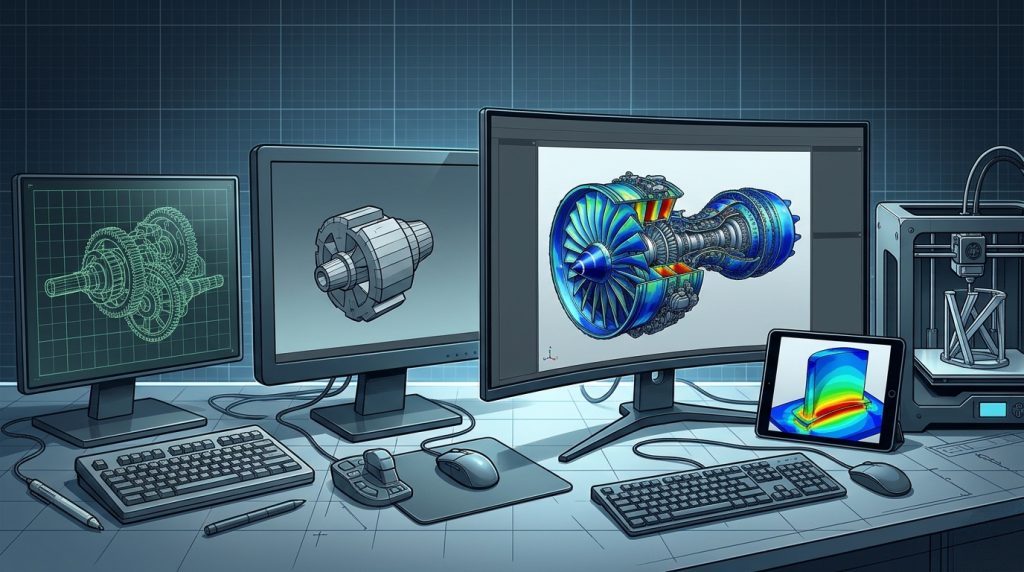
5. How CAE Works: From CAD Geometry to Engineering Results
A typical CAE workflow involves several stages.
Step 1: Import or Prepare the CAD Model
Engineers begin with a three-dimensional model created in a CAD system. Depending on the analysis, unnecessary geometric details may be removed to simplify the simulation.
Step 2: Define Materials and Physical Properties
The model is assigned relevant properties, such as elastic modulus, density, thermal conductivity, heat capacity, or fluid viscosity.
For advanced simulations, engineers may need nonlinear material data, temperature-dependent properties, or experimental material characterization.
Step 3: Create the Computational Mesh
The geometry is divided into smaller computational elements or cells. In structural FEA, these elements approximate the behavior of the physical structure. In CFD, the mesh represents the domain through which fluid-flow equations are solved.
Mesh quality and resolution can significantly influence accuracy and computational cost.
Step 4: Apply Loads and Boundary Conditions
Engineers define operating conditions, including forces, pressure, temperature, supports, fluid inlets, outlets, and other constraints.
Incorrect boundary conditions can produce misleading results, even when the software solves the equations correctly.
Step 5: Run the Simulation
The solver calculates the model response using the selected numerical methods. Complex simulations may require substantial computing resources, especially when nonlinear behavior, transient events, or detailed fluid dynamics are involved.
Step 6: Evaluate and Validate the Results
Engineers review results such as stress distribution, deformation, temperature, pressure, velocity, and fatigue life.
The findings should be checked for numerical convergence, physical plausibility, sensitivity to assumptions, and consistency with analytical calculations or experimental measurements where appropriate.
Step 7: Optimize the Design
The analysis results can guide changes to geometry, materials, wall thickness, cooling channels, or other design parameters. The revised model can then be simulated again to determine whether the changes improve performance.
6. The Impact of CAE on Modern Industry
6.1 Reducing Physical Prototype Costs
Physical prototypes and destructive tests can be expensive, especially when testing complete vehicles, aircraft structures, or large industrial systems.
CAE allows engineering teams to investigate many design variations virtually before committing to physical manufacturing and testing.
For example, virtual crash analysis can help automotive engineers evaluate structural deformation, energy absorption, and occupant-protection concepts before conducting physical crash tests.
This approach can reduce the number of prototypes required and identify design problems earlier. Nevertheless, physical crash testing and other validation activities remain important for confirming simulation predictions and meeting applicable safety requirements.
6.2 Lightweight Design and Topology Optimization
Weight reduction is a major engineering objective in automotive and aerospace development.
Topology optimization and related computational design methods help engineers identify where material may be reduced or redistributed while meeting specified constraints.
When combined with CAE, these methods can support lighter structures without sacrificing required stiffness, strength, durability, or safety.
Potential benefits include:
- Reduced vehicle mass and improved energy efficiency.
- Lower aircraft structural weight.
- More efficient material usage.
- New geometries suited to advanced manufacturing methods.
- Better trade-offs between performance, cost, and durability.
AI-assisted methods can help explore design alternatives, but optimized results must still satisfy engineering constraints and be verified through appropriate analysis and testing.
6.3 Improved Product Reliability and Durability
Products often operate under demanding conditions, including extreme temperatures, repeated mechanical loading, vibration, pressure, moisture, and corrosive environments.
CAE enables engineers to investigate these conditions during development and identify potential failure mechanisms.
Examples include:
- Evaluating fatigue life in rotating machinery.
- Studying thermal stress in electronic components.
- Analyzing vibration in aerospace structures.
- Predicting pressure-related stresses in industrial equipment.
- Assessing the behavior of materials under impact or large deformation.
These analyses help engineers make better reliability decisions and improve product durability. They cannot guarantee zero failures, but they can reduce uncertainty and help identify risks before products enter service.
6.4 Faster Product Development
Simulation enables engineers to compare design alternatives without manufacturing a separate physical prototype for every variation.
Automated workflows can run multiple analyses, compare results, and identify promising configurations. This can shorten development cycles and allow teams to investigate more alternatives within the same project timeline.
The greatest benefits typically occur when simulation is integrated early into the design process rather than used only to investigate problems after a design is nearly complete.
6.5 Better Thermal and Energy Performance
Thermal simulation and CFD are essential in applications where heat transfer, airflow, or fluid movement influences product performance.
Engineers can investigate battery cooling, electric motor temperatures, electronic device cooling, HVAC systems, engine thermal management, and industrial heat exchangers.
By understanding temperature distribution and fluid behavior, engineering teams can improve energy efficiency, reduce overheating risks, and develop more effective cooling solutions.
6.6 Supporting Sustainable Engineering
CAE can contribute to sustainability by reducing material waste, limiting unnecessary prototype production, and improving the energy efficiency of products.
For example, aerodynamic optimization can help reduce drag, while thermal analysis can support more efficient cooling systems.
The environmental benefit depends on the complete product lifecycle, including manufacturing processes, computing resources, material selection, product use, and end-of-life considerations.
7. CAE Applications in the Automotive and Aerospace Industries
Automotive Engineering
Automotive manufacturers use CAE throughout vehicle development, including:
- Crashworthiness and occupant safety.
- Body structure strength and stiffness.
- Suspension and chassis performance.
- Aerodynamics and drag reduction.
- Battery thermal management in electric vehicles.
- Noise, vibration, and harshness (NVH).
- Fatigue life and durability.
In electric vehicles, simulation is particularly important because battery packs, electric motors, power electronics, and cooling systems must work together under changing operating conditions.
Aerospace Engineering
Aerospace applications demand careful evaluation of structural integrity, aerodynamic performance, weight, and environmental loads.
CAE supports:
- Aircraft structural and fatigue analysis.
- Aerodynamic simulation.
- Thermal protection and heat transfer studies.
- Vibration and dynamic response analysis.
- Composite material evaluation.
- Turbomachinery and propulsion development.
Because aerospace components may face severe operating conditions and strict certification requirements, simulation results must be supported by appropriate verification, validation, and physical testing.
8. Understanding the Difference Between CAD, CAE, CAM, and FEA
CAD, CAE, and CAM form complementary parts of the digital engineering workflow.
| Technology | Full name | Primary purpose |
|---|---|---|
| CAD | Computer-Aided Design | Creates and modifies engineering geometry |
| CAE | Computer-Aided Engineering | Simulates and evaluates engineering behavior |
| FEA | Finite Element Analysis | A numerical method widely used for structural and other physical analyses |
| CFD | Computational Fluid Dynamics | Numerically simulates fluid flow and related physical processes |
| CAM | Computer-Aided Manufacturing | Generates manufacturing instructions and toolpaths |
FEA and CFD are not separate alternatives to CAE in the broad sense. They are important methods and disciplines used within the wider engineering simulation field.
A simplified digital product-development workflow looks like this:
CAD design → CAE simulation → Design optimization → CAM programming → Manufacturing → Physical validation
In practice, this process is iterative. Simulation may reveal a design issue that requires changes in CAD, followed by another round of analysis before manufacturing proceeds.
9. The Future of CAE: AI, Automation, and Digital Twins
CAE technology continues to evolve as computing power, automation, and data-driven methods improve.
AI-Assisted Engineering Simulation
AI can help engineers identify promising design configurations, automate repetitive tasks, and create approximate models that predict selected simulation outcomes much faster than a full numerical solver.
These methods are especially useful when exploring large design spaces. However, AI-generated predictions must be assessed for accuracy and applicability, particularly when they are used outside the conditions represented in their training data.
High-Performance and Cloud Computing
Large-scale simulations can require significant processing power and memory. High-performance computing (HPC) and cloud-based r